How to Play Otherchess
Otherchess is built on only one fundamental rule change from traditional chess: pawns are free to move in all cardinal directions (north, south, east, west), and capture in all diagonal directions, instead of being oriented in a fixed 'forward' direction.
There is no 'regular' starting position; a huge set of initial positions are playable, and suited to different strategies and styles of play.
Players choose and may author their own boards, giving competitive play another dimension.
Rules Differences from Standard Chess
- Omnidirectional Pawns: Pawns move one square in any cardinal direction (N/S/E/W) and capture diagonally in any direction
- No "Forward" Concept: Pawns can move backward, sideways, retreat, and reposition freely, so the board becomes free of basic up/down orientation.
- No Checkmate/Multiple Kings: You are never forced to escape check. Kings can be captured outright. Lose all your kings and you're eliminated.
- Multi-Player: Boards can have 2–8 sides. Each side may have multiple kings. The last surviving side wins.
- Variable Board Sizes: Play on 8x8 up to 20x20 boards with custom layouts
- Upgrade Squares Replace Home Rows: Pawns promote on special golden upgrade squares, which can be located anywhere on the board, not just along the home rows.
- Walls as Obstacles: Brown wall squares block movement (except knights can jump over)
Piece Movements
Pawn
Note that the black pawn is marked with a green circle. This indicates that has not yet moved from its starting position, and can therefore move *two* squares in any cardinal direction.
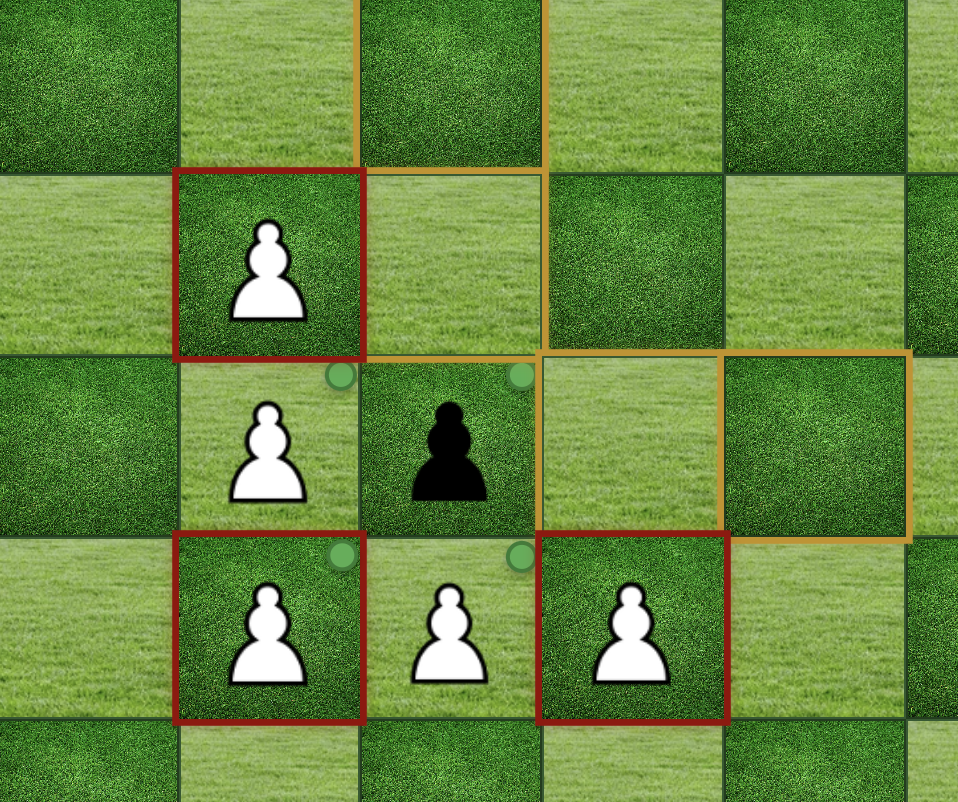
Movement: One square in any cardinal direction (north, south, east, west). No concept of "forward" - can move in any direction.
Capture: Diagonally in any direction (northeast, southeast, northwest, southwest). Can capture pieces in front, behind, or to sides.
Promotion: Automatic promotion to queen when entering any gold upgrade square
Rook
Movement: Moves any number of squares horizontally or vertically
Special: Can castle with the king. Cannot move through walls or other pieces.
Knight
Movement: Moves in an L-shape: two squares in one direction, then one square perpendicular
Special: Can jump over other pieces and walls (only piece that can jump over walls)
Bishop
Movement: Moves any number of squares diagonally
Special: Cannot move through walls or other pieces
Queen
Movement: Combines the movements of rook and bishop
Special: Most powerful piece. Cannot move through walls or other pieces.
King
Movement: Moves one square in any direction
Special: Can castle with rooks. Unlike standard chess, there is no checkmate — kings can be captured. A side is eliminated when all of its kings are captured.
Objective: Capture all of your opponents' kings. Be the last side standing.
Game Rules
Objective
Eliminate all opposing sides by capturing their kings. A side is eliminated when its last king is captured. The last side (or sides) with kings on the board wins. Boards may have 2–8 sides, each with one or more kings.
Turn Order
Active sides take turns in a fixed cycle. Eliminated sides are skipped. In a 2-player game this is simply White → Black → White. In multi-player games all active sides rotate in the order established at game start.
No Checkmate — Kings Can Be Captured
There is no checkmate in Otherchess. You are never forced to move out of check, and there is no rule against moving into check. If an opposing piece can capture your king, it simply does so on their turn and that king is removed from the board. Lose all your kings and your side is eliminated.
This is an intentional design decision. In multi-player games a side may be able to move into check safely, knowing the threatening side will itself be eliminated before it gets another turn.
Special Moves
- Castling: King and rook move simultaneously, same rules as traditional chess
- En Passant: Not applicable - pawns don't have two-square first moves in Otherchess
- Pawn Promotion: Automatic promotion to queen when pawn enters any green upgrade square
Board Features
- Walls (Brown Squares): Impassable obstacles that block all pieces except knights
- Upgrade Squares (Green Squares): Pawns automatically promote to queens when entering these squares
- Variable Sizes: Boards range from 8x8 to 20x20 with custom piece placement
Frequently Asked Questions
How is this different from regular chess?
One key rule change: pawns move in all cardinal directions (north, south, east, west) instead of only forward. This single change makes infinite board configurations possible and creates entirely new strategic depth.
What are upgrade squares?
Green squares placed anywhere on the board where pawns automatically promote to queens. They replace the traditional "8th rank" promotion system, allowing strategic promotion targets anywhere on the board.
Can pawns move backwards?
Yes! There's no "forward" or "backward" in Otherchess. Pawns move one square in any cardinal direction (north, south, east, west), making them incredibly flexible for defense and repositioning.
How do walls work?
Walls make certain squares unoccupiable. Most pieces cannot move through walls, but knights can jump over them. Walls add strategic depth by creating obstacles that must be navigated around.
Do other pieces move differently?
Rooks, knights, bishops, and queens move exactly as in standard chess. The king also moves one square in any direction and can castle — but unlike standard chess, it can be captured outright. There is no checkmate rule.
Can I move into check?
Yes. There is no rule preventing you from moving a king into an attacked square. Your king can be captured if an opponent's piece lands on it, but you are never forced to avoid or escape check. This changes the strategic calculus significantly, especially in multi-player games.
How does multi-player work?
Boards can have up to 8 sides. Each side takes turns in order; eliminated sides are skipped. A side is eliminated the moment its last king is captured. Ratings use a pairwise Elo system — surviving sides win against all eliminated sides, and sides eliminated together draw with each other.
Can I create my own board layouts?
Absolutely! Use the Board Editor to create custom boards with walls, upgrade squares, and unique shapes. You can share your creations with other players too.
Strategy Tips
Early Game
Control the center and upgrade squares. With omnidirectional pawns, you can establish strong positions from any direction and create multiple paths to promotion.
Pawn Strategy
Use your flexible pawns to create defensive formations and control key squares. They can retreat, flank, and reposition without being trapped.
Upgrade Square Control
Control upgrade squares strategically. Unlike regular chess, promotion targets can be anywhere on the board, making them high-value objectives.
Wall Navigation
Use walls to your advantage. Knights can jump over them, but other pieces must navigate around them, creating unique tactical opportunities.
Board Geography
Study the board layout carefully. The placement of walls and upgrade squares fundamentally changes piece values and strategic priorities.
Custom Boards
One of the most exciting features of Otherchess is the ability to create and play on custom board layouts. Use the Board Editor to:
- Design boards with walls and obstacles
- Create irregular board shapes and sizes
- Place upgrade squares strategically anywhere on the board
- Experiment with different board dimensions (8x8 up to 20x20)
- Share your creations with other players
Ready to create your own board?
Try the Board Editor